

What to do if your business is hit by ransomware: A practical incident response guide

⏱ 11 min read | Structured incident response guide |

What to do if your business is hit by ransomware: A practical incident response guide

A ransomware attack is no longer simply an IT problem. It can become a business continuity, data protection, legal, regulatory, financial and reputational crisis within hours.

Many businesses still assume that ransomware means their files have been encrypted and that restoring a backup will solve the problem. Modern ransomware attacks are often much more complicated.

Attackers may spend days or weeks inside an environment before encryption takes place. During that time, they may compromise accounts, escalate privileges, move between systems, identify backups, search for sensitive information and potentially copy data out of the organisation.

By the time the ransom note appears, the encryption may therefore be only one part of the incident.

The most important thing to understand about ransomware: recovering encrypted files is only one part of recovering from the attack. You also need to understand how the attackers got in, whether they still have access, what systems and data they may have accessed, what reporting or notification obligations exist, and what needs to change before the incident can genuinely be considered closed.

🚨 LIVE RANSOMWARE INCIDENT?

Before restoring backups, rebuilding servers or wiping devices, stop and complete these actions first.

1. Isolate systems
2. Protect backups
3. Preserve evidence
4. Get specialist help

Do not wipe or rebuild systems until evidence has been preserved and the attack scope has been understood. This guide is a practical framework, not a substitute for specialist incident response, legal advice or regulatory advice.

Ransomware incident response: Quick navigation

If you are dealing with an active incident, use the sections below to jump directly to the information you need.

Before you start: Separate what you know from what you think you know

One of the biggest mistakes organisations make after a ransomware attack is assuming they already know what happened.

You may believe the attacker entered through a VPN, that a phishing email caused the incident, that a firewall vulnerability was exploited, that only a handful of systems were affected or that no data was stolen.

Unless you have detailed logging, endpoint visibility, network monitoring and appropriate forensic evidence, these may only be working theories.

How did they get in?

VPN, stolen credentials, phishing, exposed services, vulnerable software or another route?

How long were they inside?

The encryption date may not be the date the compromise began.

Did they obtain administrator access?

Privileged access can dramatically increase the scope of an incident.

Which systems did they access?

Servers, endpoints, cloud services, file shares, backups and identity systems may all matter.

Was data accessed?

Access, exposure and confirmed exfiltration are different questions.

Are the attackers still present?

Recovery can be risky if an attacker still has access to the environment.

Do not confuse an assumption with an established fact. The purpose of the investigation is to replace assumptions with evidence.

What should you do in the first few hours after a ransomware attack?

The first few hours are about containment, preservation and control. They are not about making the environment look normal again as quickly as possible.

Your immediate objectives should be to prevent the attack spreading, protect recovery systems, preserve evidence and establish who is responsible for coordinating the response.

1

Contain

Stop the attack spreading.

2

Preserve

Protect evidence and logs.

3

Assess

Understand the scope.

4

Recover

Restore critical operations safely.

Step 1: Contain the ransomware attack

The first technical priority is to stop the attacker and the malware from causing further damage.

Immediate containment checklist

  • Isolate infected computers and servers.
  • Disconnect affected systems from network connections where appropriate.
  • Consider whether inbound and outbound access needs to be disabled.
  • Disable accounts that are known or strongly suspected to be compromised.
  • Protect privileged and administrator accounts.
  • Review whether backup infrastructure has been targeted.
  • Preserve firewall, VPN, endpoint and authentication logs.
  • Protect Microsoft 365 and cloud audit information.
  • Record the time and reason for every significant action.
  • Escalate to specialist incident response where appropriate.

Do not blindly wipe everything. Rebuilding systems immediately may remove evidence that could help establish how the attacker entered, what they did and whether they still have access.

The NCSC advises organisations experiencing ransomware to disconnect infected devices from network connections and, in serious cases, consider wider network isolation. It also recommends resetting credentials while taking care not to lock responders out of systems required for recovery.

Establish an incident lead

A ransomware incident can quickly become chaotic if everyone is making decisions independently.

Someone should coordinate the overall response, even if the organisation is small.

👤 Incident lead: Coordinates decisions and priorities.
💻 Technical lead: Coordinates containment, investigation and recovery.
⚖️ Legal / privacy: Assesses legal and regulatory obligations.
📣 Communications: Controls internal and external messaging.
💼 Business lead: Prioritises critical operations and customers.
🛡️ Insurance: Coordinates insurer requirements and approved suppliers.

Step 2: Understand what modern ransomware actually does

Ransomware is usually better understood as a process rather than a single piece of malware.

The exact sequence varies between attacks. Attacks could be carried out manually, but the majority are typically automated for the most part. A typical incident may involve several stages.

1
Initial access

Phishing, stolen credentials, exposed services, vulnerable systems or remote access.

2
Privilege escalation

The attacker seeks higher levels of access, potentially including administrator privileges.

3
Discovery

Systems, users, file shares, backups and valuable information are identified.

4
Data access

Sensitive information may be searched, staged or potentially exfiltrated.

5
Encryption

Systems and files may be encrypted or otherwise disrupted.

6
Extortion

The attacker demands payment and may threaten to release stolen information.

7
Pressure

Attackers may contact customers, employees, suppliers or the media.

8
Recovery

The business must contain, investigate, recover and rebuild securely.

Step 3: Determine whether data was stolen

This is often the first question management asks after ransomware:

“Did the attackers steal our data?”

Unfortunately, it is often one of the hardest questions to answer with certainty.

Many organisations do not have sufficient logging or security telemetry to establish exactly which files were accessed or copied.

Access, exposure and exfiltration are different

🔓 Access

The attacker was able to reach a system or location containing information.

👁️ Exposure

The attacker had an opportunity to view or discover information.

📤 Exfiltration

Evidence indicates information was actually copied and removed from the environment.

📢 Disclosure

Information has subsequently been published, shared or otherwise exposed outside the organisation.

These outcomes are related, but they are not interchangeable.

Screenshots, file names, folder structures or document previews published by an attacker may demonstrate some level of access or discovery. They do not necessarily prove that every file shown was copied.

The opposite is also true. The absence of obvious evidence of data theft does not prove that no data was exfiltrated.

The absence of evidence is not evidence of absence. Where visibility is limited, the organisation should continue investigating rather than prematurely declaring that no data was stolen.

What information might attackers look for?

  • HR records
  • Payroll information
  • Customer records
  • Financial information
  • Contracts
  • Legal documents
  • Identity documents
  • Intellectual property
  • Credentials and secrets
  • Commercially sensitive information

Preparation tip: Many SMEs cannot confidently answer three critical questions: What data do we hold? Where is it stored? And how sensitive is it? If a ransomware incident occurs, those gaps can significantly slow down the investigation. Identifying, classifying and reducing unnecessary data now will make it much easier to determine what attackers may have accessed in the future.

Step 4: Investigate the attack and consider digital forensics

If sensitive information may have been exposed, a specialist incident response or digital forensics investigation can be one of the most important investments following an attack.

The objective is not simply to find the ransomware executable. The objective is to understand the attack path, scope, impact and remaining risk.

What can a forensic investigation help establish?

Investigation areaKey Question
🔓 Initial accessHow did the attackers gain their initial foothold?
⏱️ Dwell timeHow long may the attacker have been inside the environment?
🔑 Privilege escalationDid the attacker obtain administrator or other privileged access?
🔀 Lateral movementWhich systems, devices and accounts did they move through?
📂 Data accessWhich information may have been accessible or exposed?
📤 ExfiltrationIs there evidence that data was staged, copied or transferred outside the organisation?

Evidence worth preserving

  • Firewall logs
  • VPN logs
  • Domain controller logs
  • Windows security logs
  • Microsoft 365 audit logs
  • Entra ID sign-in information
  • EDR alerts and telemetry
  • RMM activity
  • Backup logs
  • File access auditing
  • Email security logs
  • Relevant system images

Indicators worth investigating

A modern attacker may deliberately use legitimate administration tools and encrypted communications, so the absence of one obvious indicator should not be treated as proof that no malicious activity occurred.

Look for unusual activity such as:

  • Large or unusual outbound data transfers
  • Creation of ZIP, RAR or 7Z archives
  • Unexpected PowerShell or scripting activity
  • Use of remote administration tools
  • Unusual administrator activity
  • Unexpected privileged account usage
  • Authentication at unusual times
  • New accounts or changes to existing accounts
  • Attempts to disable security or backup systems

Important: a forensic investigation may not always be able to determine exactly which individual files were stolen. That does not make the investigation pointless. Establishing how the attacker entered, what they accessed, what privileges they obtained and whether there is evidence of exfiltration can materially improve the organisation’s risk assessment and recovery decisions.

Build an incident timeline

Create a single timeline from the moment the incident is discovered. Record facts, actions and decisions rather than relying on memory.

TimeEventEvidenceAction / decision
08:15First ransomware alertEDR / user reportDevice isolated
08:40File server inaccessibleServer logsServer isolated
09:10Suspicious administrator activityIdentity logsAccount disabled
10:00Backup infrastructure reviewedBackup logsRecovery paused pending assessment

The actual timeline will be specific to your incident. The important thing is to establish a consistent record that can be shared with management, insurers, legal advisers, investigators and regulators where appropriate.

📥FREE DOWNLOAD

Download the ransomware incident response first 24 hours checklist

Don’t try to remember everything during a crisis. A checklist can help your team work through the immediate containment, evidence preservation, account security, backup protection and escalation steps in the right order.

This field is for validation purposes and should be left unchanged.
🔒 We respect your privacy. We’ll send you your checklist immediately and only occasionally share practical cyber security insights. You can unsubscribe at any time.

Not sure how to get started?

Book an exploratory call →

Step 5: Recover safely – don’t just restore the backup

One of the most dangerous assumptions after ransomware is:

“We have backups, so we can simply restore everything.”

Backups are essential, but restoration is only one part of recovery.

Before restoring systems, you need reasonable confidence that the attacker has been removed, compromised credentials have been addressed and the recovery environment itself can be trusted.

Ask these questions before restoration

Has the attack vector been closed?

For example, has the vulnerable VPN, application, firewall or compromised account been addressed?

Are privileged credentials trustworthy?

If administrator credentials were compromised, restoring a server alone may not remove the attacker’s ability to return.

Are the backups clean?

Establish whether the attacker may have accessed or altered the backup environment.

Do you have a trusted identity system?

Identity is a critical dependency. Compromised accounts can undermine otherwise clean recovery.

Can the restored systems be monitored?

Recovery should include appropriate monitoring rather than simply reconnecting systems and hoping for the best.

What needs to come back first?

Prioritise business-critical services rather than attempting to restore everything simultaneously.

The NCSC’s current recovery guidance emphasises that organisations should establish whether the attacker has been evicted before proceeding with recovery and should work towards minimum viable operations rather than treating restoration of technology as the entire recovery objective.

Recover to minimum viable operations

Instead of asking “How do we get all our IT back?”, ask:

“What does the business absolutely need in order to operate safely today?”

🔴 Critical

Services required immediately for safety, revenue, customers, payroll or regulatory obligations.

🟠 Important

Services required within the next few days to stabilise normal operations.

🟢 Deferred

Systems that can remain unavailable while critical operations are restored.

Temporary workarounds may be necessary. However, those workarounds should themselves be security reviewed so that the recovery process does not create a second vulnerability.

Do not assume every backup is safe

Attackers increasingly understand that backups are one of the biggest obstacles to successful extortion. Backup infrastructure should therefore be treated as part of the incident investigation.

Consider:

  • When was the attacker first present?
  • When were backups last known to be clean?
  • Were backup credentials exposed?
  • Were backup servers encrypted?
  • Can backups be restored into a clean environment?
  • Have restored systems been scanned and monitored?
  • Do backups include identity and application dependencies?
  • Can the business actually restore critical services within the required timeframe?

Step 6: Consider your ICO and data protection obligations

Ransomware and data protection are closely connected.

Importantly, a ransomware incident can constitute a personal data breach even where there is no evidence that data was exfiltrated. If personal data has been encrypted and the organisation loses timely access to it, that can itself constitute a breach. Whether the incident must be reported to the ICO depends on the risk to individuals.

Does every ransomware attack need to be reported to the ICO?

No. You need to assess whether a personal data breach has occurred and then assess the likely risk to individuals.

If a personal data breach is likely to result in a risk to people’s rights and freedoms, it should be reported to the ICO without undue delay and, where feasible, within 72 hours of becoming aware of it.

You do not need to have completed the entire forensic investigation before making an initial notification. The ICO recognises that information may be incomplete and allows additional information to be supplied later.

Do not wait for perfect information. If the incident is potentially reportable, begin the assessment early. You can continue developing the factual picture as the investigation progresses.

What should you record?

  • Incident timeline
  • Investigation findings
  • Technical evidence
  • Forensic reports
  • Risk assessments
  • Client notifications
  • Board decisions
  • Mitigation measures
  • Regulatory correspondence
  • New evidence as it emerges

The ICO expects organisations to keep records of personal data breaches, including those that do not ultimately require notification.

Should you report a ransomware attack?

Reporting requirements depend on the circumstances, sector and jurisdictions involved.

Consider whether you need to engage:

🛡️ ICO

Where a personal data breach creates a reportable risk.

🚔 Law enforcement

For significant criminal activity and intelligence sharing.

🏛️ Sector regulator

Some industries have additional incident reporting requirements.

📜 Contractual contacts

Customers, suppliers or partners may have contractual notification requirements.

🛡️ Cyber insurer

Insurance policies may contain specific notification and approved-provider requirements.

🇬🇧 NCSC / relevant authorities

Significant incidents may warrant engagement with the appropriate national cyber security or law-enforcement bodies.

Step 7: Prepare for client and stakeholder notifications

Do not wait until information appears on a leak site before thinking about who may need to be contacted.

Start building an inventory of the information potentially affected and the people or organisations who could be impacted.

Identify potentially affected information

  • Employee information
  • Customer records
  • Financial information
  • Identification documents
  • Legal documents
  • Special category data
  • Supplier information
  • Contracts
  • Credentials
  • Commercially sensitive information

Identify who may be affected

  • Employees
  • Customers
  • Former customers
  • Suppliers
  • Business partners
  • Professional advisers
  • Regulators
  • Other affected third parties

Step 8: Develop a clear communication strategy

Many organisations focus almost entirely on technical recovery and underestimate the importance of communication.

During a serious incident, customers may be asking whether their data is safe, employees may be unsure what they can tell people, suppliers may be worried about connecting to your environment and management may be receiving conflicting information.

The objective is not to have every answer immediately.

The objective is to communicate honestly, consistently and clearly about what is known, what is not yet known and what is being done.

✅ Always

  • Share confirmed facts.
  • Acknowledge uncertainty.
  • Explain what actions are being taken.
  • Provide realistic updates.
  • Coordinate messaging internally.

❌ Avoid

  • Guessing the scale of the breach.
  • Making assumptions.
  • Assigning blame during the investigation.
  • Downplaying uncertainty.
  • Making promises that cannot be verified.

Step 9: Should a business pay a ransomware ransom?

This is one of the most difficult questions a business can face.

There is no universal answer that can be applied to every incident, and a ransom payment decision should not be made simply because an attacker is applying pressure.

Do not make a ransom payment decision in isolation or under pressure. Involve appropriate legal, insurance, incident response and other specialist advisers before taking action.

What does paying a ransom actually guarantee?

Unfortunately, very little.

  • It does not guarantee data deletion.
  • It does not guarantee confidentiality.
  • It does not guarantee complete recovery.
  • It does not guarantee that data will not be published.
  • It does not remove the original vulnerability.
  • It does not guarantee that the attacker will not return.

The NCSC and UK law enforcement do not encourage, endorse or condone ransom payment. Current NCSC guidance also stresses that payment does not address underlying vulnerabilities and that organisations need to consider legal, operational, ethical and reputational factors.

There may also be sanctions and other legal considerations around payments to particular criminal groups or entities, so appropriate specialist advice is essential before any payment decision is made.

Step 10: Monitor for leaked information and compromised credentials

If attackers claim to have stolen information, monitoring becomes an important part of the incident response.

What should you monitor?

📄 Published datasets

Look for evidence that organisational or personal information has been released.

🔑 Credentials

Monitor for exposed employee accounts, passwords and authentication information.

👤 Employee information

Watch for personal information appearing in leaked material.

🏢 Customer information

Identify whether client records or documents appear to have been released.

🌐 Domain mentions

Look for references to your company, brands and domains.

🎭 Impersonation

Monitor for phishing, fraudulent domains and brand abuse following the incident.

Do not investigate criminal leak sites yourself

There can be a strong temptation for a business owner or IT administrator to visit a ransomware group’s leak site to see whether their data has been published.

We strongly recommend against sending ordinary staff onto criminal leak sites to investigate an incident.

These environments can expose visitors to malware, malicious downloads, credential harvesting, browser exploits, tracking mechanisms and further attack infrastructure.

Where monitoring is required, use an appropriate cyber intelligence, incident response or digital forensics provider with suitable isolated environments and specialist tooling.

Step 11: What if the attackers eventually publish the data?

A ransomware group’s claims should neither be automatically believed nor automatically dismissed.

Attackers may:

  • Publish screenshots.
  • Release sample documents.
  • Publish partial datasets.
  • Release information in stages.
  • Sell information privately.
  • Use leaked information for further extortion.
  • Publish nothing despite making claims.
  • Overstate the amount of information they possess.

A screenshot or sample document can demonstrate that an attacker had some level of access, but it may not establish the complete extent of data exfiltration.

Equally, the absence of a leak does not prove that no data was stolen.

Keep investigating even after the immediate crisis appears to be over.The scope of data compromise may only become clearer as forensic evidence, intelligence and leaked information are correlated.

Recovery does not always mean the risk has ended

Even after systems have been restored and operations have returned to normal, organisations should consider ongoing monitoring for stolen data. In many ransomware incidents, threat actors retain copies of exfiltrated information and may publish it weeks or even months later on ransomware leak sites, criminal forums or other underground platforms.

A digital risk protection or dark web monitoring service can help identify newly leaked company data, exposed employee credentials and references to your organisation before customers, suppliers or staff become aware of the disclosure themselves.

Early visibility can provide valuable time to assess the impact, support regulatory decision-making, update communications plans and understand exactly what information has been published.

📥 Free resource: Ransomware evidence preservation checklist

Evidence preservation is already included within our free “First 24 hours ransomware checklist.”

Download the full checklist for guidance on preserving logs, system evidence, account activity and other information that may be needed during an investigation.

Get the “first 24 hours checklist”

Your first 30 days after a ransomware attack

Recovery is rarely completed in a single day. The first 30 days should be treated as a structured programme rather than a series of disconnected technical tasks.

Day 0-1

Contain

Stop the attack spreading and establish control of the incident.

  • Isolate affected systems
  • Protect backup infrastructure
  • Preserve evidence
  • Disable compromised accounts
  • Establish incident leadership
  • Contact specialist responders and insurers
Days 2-7

Understand

Determine what happened, what was affected and whether data was exposed.

  • Begin forensic investigation
  • Determine likely initial access
  • Assess privilege escalation
  • Assess lateral movement
  • Assess possible data exposure
  • Begin recovery planning
Days 7-14

Stabilise

Restore critical operations while reducing ongoing risk.

  • Restore priority business services
  • Reset compromised credentials
  • Increase monitoring
  • Prepare customer communications
  • Monitor for credential exposure
  • Review critical security controls
Days 14-30

Rebuild

Address root causes and strengthen long-term resilience.

  • Complete root cause analysis
  • Remediate vulnerabilities
  • Strengthen identity security
  • Review remote access controls
  • Improve endpoint monitoring
  • Test backup and recovery processes
  • Document lessons learned

Beyond 30 days: turn recovery into resilience

The incident should not be considered finished simply because the systems are working again.

The final objective is to understand why the incident happened, close the weaknesses that enabled it and improve the organisation’s ability to detect, contain and recover from the next incident.

30+

Remediate

Close vulnerabilities, strengthen identity, review privileged access, improve network controls and confirm backup integrity.

60+

Validate

Conduct vulnerability assessment, penetration testing, recovery testing and an incident response exercise.

90+

Build resilience

Embed ongoing monitoring, security governance, staff training, supplier assurance and regular recovery exercises.

How to prevent another ransomware attack

Once the immediate incident is under control, the organisation should move from recovery to prevention and resilience.

1. Strengthen identity security

  • Enable MFA wherever possible.
  • Protect administrator accounts.
  • Use separate privileged accounts.
  • Review inactive accounts.
  • Monitor unusual authentication.
  • Review conditional access policies.
  • Remove unnecessary privileged access.
  • Regularly review service accounts.

2. Improve endpoint protection

Traditional antivirus alone may not provide sufficient visibility into a modern intrusion.

Consider appropriate endpoint detection and response (EDR) or managed detection and response (MDR), particularly where internal teams cannot continuously monitor endpoint telemetry.

3. Improve vulnerability management

🔧 Patch management

Identify and remediate critical vulnerabilities quickly.

🔍 Vulnerability scanning

Regularly identify weaknesses across the environment.

🔥 Firewall review

Review exposed services, rules and unnecessary internet access.

🧪 Penetration testing

Test whether weaknesses can be chained into meaningful attack paths.

4. Protect backups

A backup that cannot be trusted or restored is not a reliable recovery strategy.

Consider maintaining multiple copies, separate storage mechanisms and an appropriately protected immutable or offline recovery copy. Most importantly, test restoration.

5. Reduce the external attack surface

  • Review VPN exposure.
  • Remove unnecessary Remote Desktop exposure.
  • Review open firewall ports.
  • Remove legacy authentication where possible.
  • Retire unsupported operating systems.
  • Review externally exposed applications.
  • Monitor internet-facing assets.
  • Review third-party remote access.

6. Improve security awareness

Technology is only part of the defence.

Staff should receive practical, ongoing training covering phishing, malicious attachments, password security, MFA fatigue, social engineering and the correct process for reporting suspicious activity.

7. Test your recovery plan

An incident response plan that exists only as a document has limited value.

Test it.

Questions worth testing

If you cannot answer these confidently, your recovery plan may need work.

⏱️

How quickly can we respond?

Who gets called first and who has authority to make decisions?

💾

Can we actually restore?

Have backups been tested recently under realistic conditions?

👥

Can the business operate?

What happens if Microsoft 365, file servers or key applications are unavailable?

🔐

Can we trust our identity?

What happens if administrator accounts and identity systems are compromised?

📣

Who communicates?

Can you communicate consistently with staff, customers, suppliers and regulators?

🧪

Have we rehearsed it?

Have the people responsible actually practised the incident response process?

What good ransomware preparedness looks like

Businesses do not need an unlimited cyber security budget to become more resilient. They do need visibility, preparation, sensible controls and a clear response process.

🔐 Identity
MFA, privileged access controls and strong authentication.
🛡️ Protection
EDR, patching, firewalls and secure configurations.
👁️ Visibility
Logging, monitoring and meaningful security alerts.
💾 Recovery
Protected, tested and recoverable backups.
📋 Response
A documented and tested incident response plan.
🏢 Resilience
Business continuity and minimum viable operations planning.

📥Free resource

Download the ransomware recovery planner

Use a practical 30/60/90-day planner to track containment, investigation, recovery, remediation and resilience actions after a cyber incident.

This field is for validation purposes and should be left unchanged.
🔒 We respect your privacy. We’ll send you your planner immediately and only occasionally share practical cyber security insights. You can unsubscribe at any time.

Common mistakes businesses make after ransomware

🚫 Wiping systems immediately

Rebuilding before evidence is preserved can make it much harder to understand what happened.

Impact: reduced visibility

🚫 Assuming the backup solves everything

A clean backup does not automatically remove compromised accounts or an attacker’s persistence.

Impact: reinfection risk

🚫 Assuming no leak means no theft

Attackers may retain information privately or release it later.

Impact: incorrect risk assessment

🚫 Treating ransomware as only an IT problem

Recovery also involves business continuity, legal, regulatory, customer and reputational considerations.

Impact: wider business disruption

🚫 Waiting for perfect information

Some decisions, including regulatory assessments, need to begin before the forensic picture is complete.

Impact: missed deadlines

🚫 Forgetting to test the recovery plan

A theoretical recovery plan can fail when real systems, people and suppliers are under pressure.

Impact: slower recovery

Final thoughts: ransomware recovery is bigger than restoring files

The organisations that recover best from ransomware are not necessarily those with the largest IT budgets.

They are often the organisations that can establish control quickly, preserve evidence, make informed decisions and keep the business operating while the investigation continues.

If there is one lesson to take away from this guide, it is this:

Do not focus solely on recovering encrypted files. Focus on understanding how the attackers got in, whether they still have access, what they may have accessed, what data may have been compromised, what obligations the business has and what needs to change before the incident can genuinely be considered closed.

A ransomware incident is simultaneously a technology incident, a business continuity incident, a potential data protection incident and, in many cases, a significant legal and reputational event.

The technical recovery is important. But understanding the incident, managing the uncertainty and rebuilding the organisation in a more resilient way is what turns recovery into genuine cyber resilience.

NEED HELP AFTER AN INCIDENT?

Cyber incident response & digital forensics

If your organisation has suffered ransomware or another serious security incident, the priority is to establish control, preserve evidence and understand what happened before making major recovery decisions.

🛡️

Contain the incident

Help isolate affected systems and reduce the risk of further compromise.

Understand the attack

Investigate the attack path, affected systems, accounts and potential data exposure.

Preserve evidence

Protect the technical evidence required for investigation, insurance, legal and regulatory purposes.

Recover confidently

Support a controlled recovery rather than simply restoring systems and hoping the threat has gone.

If you are dealing with an active incident, specialist help should be brought in as early as possible.

Discuss an incident

XC360 has more than 25 years’ experience supporting businesses through complex IT and cyber security challenges.

Ransomware incident response FAQs

Prioritise containment and evidence preservation. Isolate affected systems, consider compromised remote access and accounts, protect backup infrastructure, preserve relevant logs and involve appropriate incident response specialists. Avoid making major recovery changes before understanding whether the attacker still has access.

It depends on the circumstances. Disconnecting infected devices can help contain an attack, but indiscriminately powering down systems can also affect evidence and recovery. In our experience, the best course of action, is to disconnect infected devices from network connections and considering wider isolation in serious incidents.

Backups can be central to recovery, but first establish whether they can be trusted and whether the attacker has been removed. Restoring into an environment where compromised accounts or persistence remain can allow the incident to restart.

Look for evidence across firewall, VPN, identity, endpoint, file access, backup and network telemetry. However, it may not always be possible to establish exactly which files were exfiltrated. Screenshots or file listings published by an attacker may prove access or discovery without proving complete data theft.

Ransomware can constitute a personal data breach even without confirmed exfiltration because loss of timely access to personal data can itself constitute a breach. Whether the breach is reportable to the ICO depends on the risk to individuals.

Not every ransomware incident requires an ICO notification. If a personal data breach is likely to result in a risk to individuals’ rights and freedoms, notification is generally required without undue delay and, where feasible, within 72 hours of becoming aware of the breach.

Do not assume you need to wait until the investigation is complete. The ICO recognises that complex incidents may not be fully understood within 72 hours. Where notification is required, provide the information available and submit additional information as the investigation develops.

Do not make the decision simply because the attacker is applying pressure. Payment does not guarantee recovery, deletion of stolen information or future safety. Consider legal, insurance, operational and reputational implications and obtain appropriate specialist advice before making a decision.

Treat the publication as an important source of evidence, but do not automatically assume that screenshots or sample files represent the full extent of the compromise. Analyse the material safely, correlate it with forensic evidence and update your risk assessment.

It depends heavily on the size and complexity of the organisation, the extent of the compromise, the availability of trusted backups and whether identity systems have been affected. Serious incidents can take weeks or longer to recover from. The NCSC recommends treating recovery as a structured programme aimed at restoring minimum viable operations before moving into longer-term rebuild.

Preserve relevant firewall, VPN, identity, Windows, endpoint, backup, email and file-access logs, together with ransom notes, suspicious files, system images and a detailed incident timeline. The exact evidence required will depend on the incident and should ideally be determined with specialist responders.

If the incident involves sensitive information, privileged access, significant disruption or uncertainty about what the attackers did, specialist incident response or digital forensics can provide valuable evidence about the attack path, scope, persistence, lateral movement and possible data exfiltration.

Focus on identity security, MFA, privileged access, endpoint detection, vulnerability management, secure firewalls and remote access, protected and tested backups, security monitoring, staff awareness and a tested incident response plan. The objective should be resilience rather than simply trying to prevent every possible attack.

Continue your cyber resilience journey

Ransomware response is only one part of building a resilient IT environment. The next step is to understand where your organisation is exposed and prioritise the controls that will make the greatest difference.

Important: This guide is intended to provide general practical information for businesses dealing with cyber incidents. It is not legal, regulatory, forensic or insurance advice. Every incident is different, and organisations should obtain appropriate specialist advice based on the circumstances of the attack.

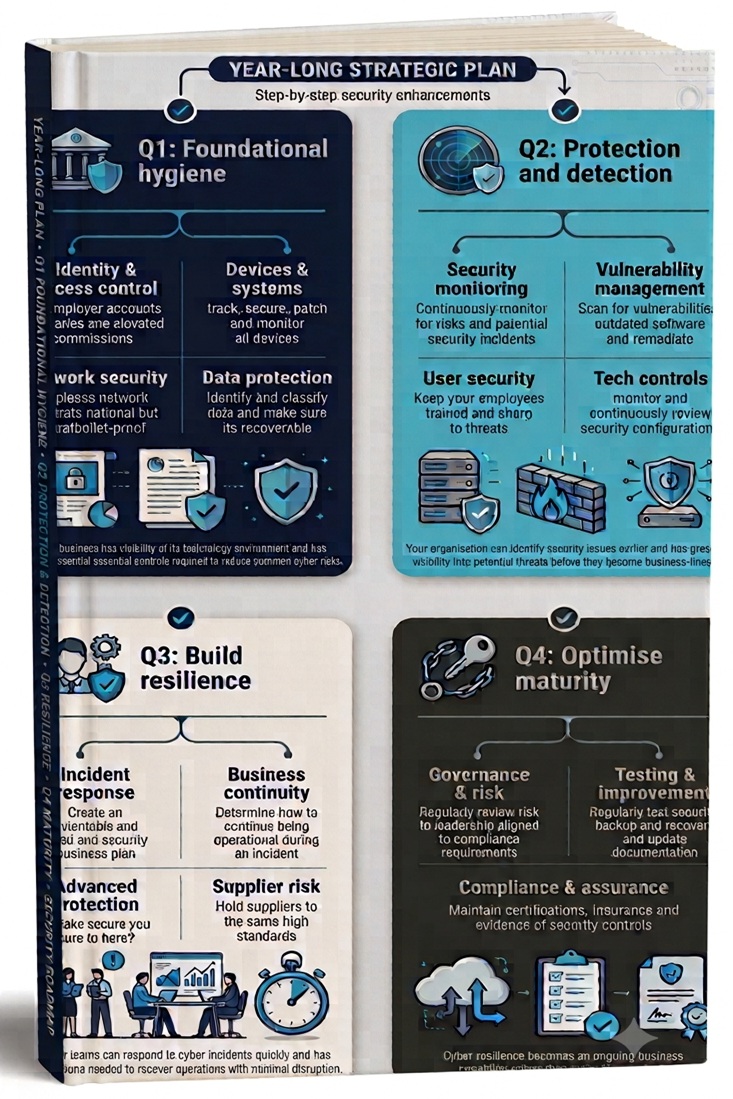
Cyber resilience for small businesses: Cyber Essentials, NIS2 and CAF explained

⏱ 8 min read | Cyber resilience guide | NIS2 | Cyber Essentials | UK SMEs

Cyber resilience for small businesses: Cyber Essentials, NIS2 and CAF explained

This guide explains how UK SMEs can move from basic cyber security controls towards practical cyber resilience, using Cyber Essentials, the Cyber Assessment Framework and NIS2 expectations as reference points. It is written for business owners and managers who need practical cyber resilience guidance, not enterprise-level security theory

We’ll address:

  • How Cyber Essentials fits into a wider resilience journey.
  • Why cyber resilience is becoming a business continuity issue.
  • How to assess your current maturity and identify what to improve next.

Imagine Monday morning arrives and your Microsoft 365 tenant has been compromised.

Staff cannot access email.

Shared files are unavailable.

Customer communications stop.

The question is no longer: “How did the attacker get in?”

The question becomes: “How quickly can we continue operating?”

In our experience the small business owners we speak with feel cyber security is something that only concerns large enterprises, government departments and critical infrastructure providers.

Unfortunately, cyber criminals don’t think that way.

Whether you employ five people or five thousand, your business likely stores customer information, financial records, contracts, employee data and emails. To an attacker, that can be just as valuable as the systems of a multinational organisation.

Cyber resilience is not just about stopping attacks. It is about making sure the business can continue operating when email, files, systems, suppliers or cloud services are disrupted.

At the same time, cyber security regulations and expectations are changing rapidly. The European Union’s NIS2 Directive, the UK’s proposed Cyber Security and Resilience Bill and growing supply-chain requirements are raising the standard businesses are expected to meet.

Even where small businesses are not directly regulated, they are increasingly being required to demonstrate cyber security and resilience before they can win contracts, renew agreements or work with larger organisations.

✅ This guide is for you if…

  • You already have Cyber Essentials and want to know what comes next.
  • Customers or suppliers are asking about cyber security, resilience or compliance.
  • Your business relies on Microsoft 365, cloud services or remote working.
  • You’re concerned about ransomware, downtime or disruption.
  • You want a practical roadmap rather than more cyber jargon.
  • You need to demonstrate cyber maturity to customers, insurers or supply chain partners.

❌ This guide may not be relevant if…

  • You’re only looking for information about a specific security product.
  • You already have a mature cyber resilience programme with tested recovery and governance processes.
  • Your focus is solely achieving a compliance certification without improving resilience.
  • You are looking for enterprise-level security frameworks rather than SME-focused guidance.

Understanding the cyber resilience journey

What we have found works best for SMEs is for them to focus on building cyber resilience in stages. Strong foundations make security, resilience and compliance significantly easier to achieve and far more sustainable over the long term.

1
Cyber Essentials

Build strong security foundations with MFA, firewalls, secure configuration, patch management and user access controls.

Outcome: Reduce common cyber risks.

2
Cyber Resilience

Move beyond prevention with monitoring, incident response planning, recovery testing, business continuity and supplier risk management.

Outcome: Detect, respond and recover quickly.

3
NIS2 Readiness

Demonstrate organisational maturity through governance, accountability, resilience planning, supplier assurance and evidence-based security.

Outcome: Build trust with customers, insurers and supply-chain partners.

Cyber Essentials is the baseline. Cyber resilience is the operating capability. NIS2 and CAF show where customer, supplier and regulatory expectations are heading.

Not sure which stage you’re at? The Cyber Resilience Roadmap includes a 20-point self-assessment, maturity scoring guide and practical 12-month improvement plan designed specifically for UK SMEs.

Download the roadmap →


The reality of cyber crime in the UK

Cyber attacks are no longer rare events.

43%
UK businesses reporting a cyber breach or attack
612k
Estimated UK businesses affected annually
69%
Large businesses experiencing attacks
85%
Breaches involving phishing

What this means for SMEs: The issue is not only whether an attack happens. The bigger question is whether the business can continue trading, communicate with customers, restore critical data and recover quickly when disruption occurs.

The majority of cyber incidents we’ve seen that affect SMEs are not caused by advanced nation-state attackers. They are usually the result of compromised identities, phishing attacks, weak patching, poor access control, untested backups or vulnerable suppliers.

The financial impact can include business interruption, recovery costs, regulatory investigations, legal fees, customer notifications, reputational damage and lost contracts.

What makes modern attacks particularly dangerous is that criminals increasingly target supply chains. Rather than attacking a large enterprise directly, they compromise smaller suppliers and service providers that have trusted access to customer systems or data.

This growing supply-chain threat is one of the primary reasons behind NIS2 and the UK’s broader cyber resilience agenda.

Why NIS2 exists

NIS2 (Network and Information Systems Directive 2) was introduced by the European Union to improve cyber security and operational resilience across critical sectors.

In today’s connected world, a vulnerability in a single supplier can impact hundreds or even thousands of organisations.

NIS2 expands cyber security requirements beyond traditional critical infrastructure and places far greater emphasis on resilience. (How quickly and effectively can you get back to full operation.)

In simple terms, NIS2 raises expectations around how organisations manage cyber risk, report incidents, protect supply chains and maintain operational resilience. Customers, suppliers and insurers are increasingly asking these questions about resilience, recovery and evidence.

NIS2 focuses heavily on:

  • Governance and accountability
  • Cyber risk management
  • Incident reporting
  • Business continuity
  • Supply chain security
  • Third-party risk management
  • Recovery planning
  • Operational resilience

What this means for SMEs

You may never be directly regulated by NIS2.

However, customers, insurers and larger organisations increasingly expect evidence that your business:

  • Manages cyber risks
  • Protects customer data
  • Can recover from disruption
  • Reviews supplier security

The objective is simple : Improve the ability of organisations to withstand, respond to and recover from cyber attacks.


Why UK businesses should care about NIS2

Many SMEs assume they are exempt from NIS2 because they do not meet the size thresholds.

Technically, that may be correct.

Commercially, it often is not.

Large organisations that fall within NIS2, the UK’s cyber resilience framework and emerging supply chain requirements are increasingly expected to assess the security posture of suppliers and partners.

This means many SMEs are already being asked to demonstrate cyber maturity before contracts are signed or renewed.

Questions customers increasingly ask suppliers

Security Controls
  • Do you have Cyber Essentials?
  • Do you use MFA?
  • Do you monitor for cyber threats?
  • Are devices patched and compliant?
Resilience & Recovery
  • How quickly could you recover from ransomware?
  • What backups do you maintain?
  • How do you report incidents?
  • Which suppliers support critical services?
For the SMEs we work with, cyber security is no longer simply a technical requirement. It is becoming a prerequisite for winning and retaining business.

The Cyber Resilience Roadmap helps you prepare for these questions by assessing your current maturity and identifying practical evidence gaps.

Download the roadmap →

Businesses that can demonstrate a structured approach to cyber security, business continuity and compliance increasingly have a competitive advantage during procurement and supplier reviews.


The UK’s approach: The Cyber Assessment Framework (CAF)

Whilst NIS2 is an EU directive, the UK’s primary framework for cyber resilience is the National Cyber Security Centre’s Cyber Assessment Framework (CAF).

The CAF is useful because it shifts the conversation from security tools to business outcomes. It asks whether an organisation can manage risk, defend against attacks, detect incidents and minimise disruption.

It is built around four core objectives.

1
Managing security risk

Technical: Ensuring governance, risk management, asset management and supply chain controls are effective.

Business outcome: “We understand our biggest cyber risks and who owns them.”

2
Defending against cyber attacks

Technical: Protecting systems, users and data from cyber threats.

Business outcome: “We reduce the likelihood of a cyber incident disrupting the business.”

3
Detecting cyber security events

Technical: Identifying suspicious activity and security incidents as quickly as possible.

Business outcome: “We identify suspicious activity before it becomes a major incident.”

4
Minimising the impact of cyber incidents

Technical: Ensuring organisations can continue operating and recover quickly following an attack.

Business outcome: “We know how to keep operating and recover quickly when disruption occurs.”

The CAF is increasingly becoming the benchmark that underpins broader UK cyber resilience expectations and future legislation. It is a useful way for SMEs to think about resilience maturity.


The Cyber Security and Resilience Bill

To strengthen national cyber resilience further, the UK Government is introducing the Cyber Security and Resilience Bill.

The legislation is designed to modernise and strengthen the UK’s existing Network and Information Systems framework, reflecting the way modern organisations now operate.

The important message for SMEs is not that every small business will suddenly become regulated, but that cyber resilience expectations are increasing across critical services, supply chains and digital providers.

  • Bringing additional organisations and critical suppliers into scope.
  • Faster reporting requirements and increased visibility for regulators.
  • Greater accountability across supplier ecosystems and digital services.

The direction of travel is clear

Cyber security is moving from an IT concern to a board-level business responsibility.

The organisations that succeed will be those that can prove both security and resilience.


Where Cyber Essentials fits into the picture

The good news is that most businesses do not need to immediately tackle NIS2-level maturity.

Instead, they should start with the fundamentals.

This is exactly why Cyber Essentials exists.

Cyber Essentials is the UK Government-backed cyber security certification designed to protect organisations against the most common internet-based attacks.

For most SMEs, Cyber Essentials is the first meaningful step towards stronger cyber resilience. The mistake is treating it as the end of the journey.

The five Cyber Essentials controls

Firewalls

Control inbound and outbound access to your network.

Secure Configuration

Remove unnecessary settings and reduce attack surfaces.

User Access Control

Ensure staff only have access to what they need.

Malware Protection

Protect devices against malicious software.

Security Updates

Patch vulnerabilities before attackers exploit them.

According to the National Cyber Security Centre, Cyber Essentials represents the minimum acceptable level of cyber security for modern organisations.

Many common cyber attacks succeed because basic controls are missing. Cyber Essentials is designed to address exactly those weaknesses.

Cyber Essentials is the foundation, not the finish line

One mistake businesses make is treating Cyber Essentials as a compliance exercise.

It is not.

It is the beginning of a cyber resilience journey.

Cyber Essentials is an excellent starting point for improving cyber security and reducing common risks. However, modern cyber resilience goes further. It focuses not only on preventing attacks, but also on detecting threats, responding effectively and recovering quickly when disruption occurs.

🛡️
Cyber Essentials

Establishes the baseline technical controls needed to reduce exposure to common cyber threats.

What it helps with:
  • ✅ Multi-factor authentication (MFA)
  • ✅ Patch management
  • ✅ Firewalls
  • ✅ User access controls
  • ✅ Malware protection

Outcome: Reduce the likelihood of common attacks succeeding.

🔄
Cyber Resilience

Builds the operational capabilities required to detect, respond to and recover from incidents while keeping the business running.

Cyber resilience adds:
  • ✅ Security monitoring
  • ✅ Recovery testing
  • ✅ Incident response planning
  • ✅ Business continuity planning
  • ✅ Supplier and third-party assurance

Outcome: Minimise downtime, disruption and business impact.

Cyber Essentials addresses a valuable set of baseline technical controls. Broader cyber resilience frameworks place additional emphasis on governance, incident response, recovery, supply-chain assurance and evidence.

That doesn’t reduce its value. In fact, it makes Cyber Essentials one of the highest-return investments most SMEs can make because it provides the foundation upon which everything else is built.

Why Cyber Essentials remains one of the most important first steps

  • Improves cyber security awareness
  • Encourages better operational practices
  • Supports supplier assurance requirements
  • Improves customer confidence
  • Strengthens cyber hygiene
  • Reduces exposure to common attacks

Cyber Essentials helps lock the front door. Cyber resilience ensures your business can continue operating if an attacker finds another way inside.

Where are you on the cyber resilience journey?

Understanding your current maturity is the first step towards improving cyber resilience. Whether you’re building Cyber Essentials foundations, developing resilience capabilities or preparing for supplier and compliance requirements, the roadmap helps you identify your next priorities.

Assess
Measure your current maturity level.
Prioritise
Identify the highest-impact improvements.
Improve
Follow a practical 12‑month roadmap.

Download the roadmap →


What is the Cyber Resilience Pledge?

Recognising that cyber security cannot be solved through technology alone, the UK Government has also introduced the Cyber Resilience Pledge.

The pledge provides organisations with a visible way to demonstrate their commitment to improving cyber resilience and organisational maturity.

Unlike Cyber Essentials, the pledge focuses less on technical controls and more on organisational behaviours and long-term resilience.

The pledge encourages organisations to focus on leadership engagement, risk management, security accountability, continuous improvement, security culture and long-term resilience planning.


Security versus cyber resilience

Many organisations still approach cyber security as though the goal is to stop every attack.

Unfortunately, modern ransomware groups, supply-chain attacks and identity-based threats have shown that no organisation can realistically guarantee prevention forever.

This is where cyber resilience changes the conversation.

🛡️Traditional Cyber Security

Can we stop an attack?

  • Stop attacks
  • Block malware
  • Prevent unauthorised access
  • Reduce vulnerabilities
  • Strengthen perimeter security
🔄Cyber Resilience

Can we recover quickly, minimise disruption and keep operating?

  • Prevent attacks where possible
  • Detect incidents quickly
  • Maintain operations during disruption
  • Recover rapidly
  • Learn and improve afterwards

Cyber security reduces the chance of disruption. Cyber resilience reduces the impact when disruption still happens.

The Cyber Resilience Roadmap helps you assess both sides: prevention controls and resilience capabilities.

Download the Cyber Resilience roadmap →

The uncomfortable reality

No firewall, antivirus platform, security awareness programme or cyber security provider can guarantee that an organisation will never experience a cyber incident.

Eventually, a determined attacker, supplier compromise, stolen credential or human mistake may succeed.

What separates resilient businesses from vulnerable ones?

1

Detect

Spot attacks before they escalate.

2

Respond

Contain incidents quickly and effectively.

3

Recover

Restore systems and services rapidly.

4

Improve

Reduce future risk and strengthen resilience.

The key takeaway

A cyber attack does not automatically become a business disaster.

The organisations that recover fastest are rarely the organisations with the biggest security budgets.

They are the organisations that have invested in resilience, recovery, business continuity and incident response before an attack occurs.

Security tries to stop attacks.
Cyber resilience ensures your business survives them.


The seven pillars of Cyber Resilience

Building cyber resilience is not about deploying more technology. It is about strengthening the core capabilities that help your business prevent attacks, withstand disruption and recover quickly when incidents occur.

Identity & Access

Protect accounts, privileges and administrative access to reduce the risk of compromise.

Devices & Endpoint Security

Secure, monitor and manage every device connected to your business.

Data Protection & Recovery

Ensure critical systems and data can be recovered when disruption occurs.

Network & Cloud Security

Protect the infrastructure, cloud platforms and services your business relies on.

Security Culture

Reduce human risk through awareness, accountability and security-focused behaviours.

Monitoring & Response

Identify threats quickly and respond before they become major incidents.

Business Continuity

Keep critical services operating during disruption and recover business operations as quickly as possible.

The complete self-assessment, maturity scoring model and practical implementation roadmap for all seven pillars is included within the Cyber Resilience Roadmap.

Assess your current maturity, identify priority gaps and follow a practical 12‑month roadmap designed specifically for SMEs.

Download the Cyber Resilience roadmap →


Common cyber resilience mistakes SMEs make

Most cyber incidents are not caused by a single advanced attack technique. They often happen because simple protections are missing, processes are inconsistent or weaknesses are only discovered after something has gone wrong.

❌ Mistake #1: Buying tools before fixing the basics

Advanced products cannot compensate for missing fundamentals such as MFA, patching, reliable backups and secure access controls.

Business impact
Weak foundations create avoidable cyber risk.
❌ Mistake #2: Assuming Microsoft 365 secures itself

Microsoft 365 includes strong security capabilities, but settings, permissions, alerts and backup responsibilities still need active management.

Business impact
Misconfigured cloud services increase exposure.
❌ Mistake #3: Never testing backups

A backup that has never been restored is only an assumption. Recovery must be tested before the business depends on it.

Business impact
Recovery delays lead to longer downtime.
❌ Mistake #4: Treating cyber security as IT only

Cyber incidents affect operations, finance, customers, suppliers and leadership decisions, not just technology teams.

Business impact
Poor coordination slows recovery efforts.
❌ Mistake #5: Focusing only on prevention

Even good controls can fail. Resilient businesses prepare to detect, respond, recover and improve after an incident.

Business impact
Incidents cause greater disruption when no recovery plan exists.
❌ Mistake #6: Ignoring suppliers and third parties

Your cyber resilience depends on the suppliers, platforms and partners that access your systems or support critical services.

Business impact
Third-party weaknesses become your weaknesses.

The key lesson: cyber resilience does not require enterprise-level complexity. It requires strong foundations, clear priorities and a structured improvement plan.

The Cyber Resilience Roadmap includes the full self-assessment, maturity scoring model and practical 12-month action plan to help you avoid these common mistakes.

Download the Cyber Resilience roadmap →


How XC360 helps businesses build cyber resilience

Building cyber resilience requires more than a single product or certification. It requires multiple layers working together across security, compliance, recovery and ongoing management.

Protect

Cyber security

Threat monitoring, endpoint protection and proactive defence.

Assess

Penetration testing

Identify vulnerabilities before attackers do.

Recover

Business continuity

Reduce downtime and recover faster following incidents.


The businesses that thrive are the prepared ones

The question is no longer:

Will cyber security become important for my business?

The question is now:

Will my business be ready when a customer, regulator, insurer or cyber incident demands it?

Cyber resilience is becoming a significant competitive advantage.

  • Client confidence : Demonstrate security to customers and stakeholders.
  • Supplier Approval : Meet growing security expectations faster.
  • Reduced Risk : Lower the likelihood and impact of incidents.
  • Better Insurance : Improve cyber insurance positioning.
  • Faster Recovery : Reduce operational disruption following incidents.
  • Commercial Advantage : Win contracts where competitors cannot demonstrate resilience.

Cyber Essentials vs Cyber Resilience vs NIS2

One of the biggest causes of confusion for SMEs is understanding how Cyber Essentials, Cyber Resilience and NIS2 work together.

They are not competing frameworks. They represent different stages and levels of cyber maturity.

AreaCyber EssentialsCyber ResilienceNIS2
PurposeSecurity baselineBusiness continuityRegulatory framework
FocusPrevent common attacksPrevent, detect and recoverGovernance and resilience
Technical ControlsFive core controlsBroad security programmeComprehensive controls
Incident ResponseLimitedMajor focus areaRequired
Business ContinuityMinimalCore objectiveMandatory consideration
Supply Chain SecurityLimitedImportantMajor focus area
GovernanceBasicRisk basedBoard accountability
Best ForStarting outGrowing businessesHighly regulated organisations

The journey should follow this path:

Cyber Essentials → Security Monitoring → Business Continuity → Cyber Resilience → NIS2 Readiness

Trying to achieve NIS2-level maturity without foundations is like building a house without a base.


FREE DOWNLOAD

Download the SME cyber resilience roadmap

Assess your current maturity, identify priority gaps and build a practical 12-month improvement plan.

Cyber Resilience Roadmap for SMEs
5 stage maturity model
20 point assessment
7 cyber resilience pillars
Quarterly roadmap
NIS2 readiness
Common mistakes

This field is for validation purposes and should be left unchanged.
🔒 We respect your privacy. We’ll send you your guide immediately and only occasionally share practical cyber security insights. You can unsubscribe at any time.

Not sure how to get started?

Book a cyber security review →


What this means for your business…

The businesses that thrive are not necessarily the organisations with the largest IT budgets.

They are the organisations that build strong foundations, understand their risks, prepare for disruption and continuously improve their resilience.

Cyber Essentials provides the starting point. Cyber resilience ensures your business can continue operating when disruption occurs. NIS2 provides a useful blueprint for where cyber maturity is heading.

Organisations that start building resilience today will be better positioned to satisfy customer requirements, improve operational stability and reduce risk tomorrow.


Want to understand how resilient your business really is?

Whether you’re starting with Cyber Essentials, reviewing supplier requirements or preparing for future cyber resilience obligations, XC360 can help you build a practical roadmap aligned to your business goals.

Book a free cyber resilience consultation


Frequently asked questions

Cyber resilience is a business’s ability to prevent common cyber attacks, detect threats quickly, respond effectively, recover systems and continue operating when disruption occurs. It extends beyond traditional cyber security by focusing on business continuity and recovery as well as prevention.

Cyber security focuses on preventing attacks and protecting systems. Cyber resilience focuses on ensuring the business can continue operating, recover quickly and minimise disruption when prevention fails.

Cyber Essentials is an excellent foundation that helps protect against common cyber attacks. However, cyber resilience also requires monitoring, incident response planning, backup testing, business continuity planning and supplier risk management.

Many SMEs are not directly regulated by NIS2. However, customers, insurers and larger organisations increasingly expect suppliers to demonstrate resilience, strong security controls and cyber maturity, making NIS2 principles commercially relevant for many businesses.

The Cyber Assessment Framework (CAF) is the National Cyber Security Centre’s framework for assessing cyber resilience. It focuses on managing security risk, defending against attacks, detecting incidents and minimising business disruption.

A practical cyber resilience roadmap should include security fundamentals, recovery planning, backup testing, business continuity measures, supplier assurance, monitoring capabilities and a structured improvement plan based on current maturity.

Recovery processes should be tested regularly to ensure critical systems and data can be restored when needed. The appropriate testing frequency depends on business risk, regulatory requirements and operational impact, but untested backups can create a false sense of security.

A structured cyber resilience assessment should review identity protection, device security, backup and recovery capabilities, monitoring, business continuity, supplier risk and governance. The Cyber Resilience Roadmap includes a 20-point self-assessment designed specifically for UK SMEs.

Many cyber incidents now involve third parties, suppliers or service providers. Understanding supplier dependencies and reviewing third-party security helps reduce the risk of disruption spreading into your organisation.

Cyber resilience is becoming increasingly important because customers, insurers, suppliers and regulators increasingly expect businesses to demonstrate their ability to manage cyber risks, recover from disruption and maintain operations during incidents. For many SMEs, resilience is becoming a competitive advantage as well as a security requirement.

The complete guide to managed IT services for businesses (UK 2026)

⏱ 17 min read | Managed IT buyer’s guide |

“Businesses rarely invest in IT support for the support itself. They invest in reliability, security and the confidence that their technology won’t hold them back.”

✔️ Who this is for

  • Business owners responsible for IT decisions
  • Operations and finance leaders managing technology spend
  • IT managers reviewing external support providers
  • Companies considering outsourcing IT or switching provider

✖️ Who this is not for

  • Businesses looking for ad-hoc or one-off IT fixes
  • Highly specialised enterprise IT procurement teams
  • Organisations managing fully internal enterprise IT functions

The complete guide to managed IT services

Choosing the wrong IT provider can lead to downtime, security gaps, frustrated employees and rising costs. Choosing the right one can improve productivity, strengthen security and help your business scale more effectively.

Managed IT services provide ongoing monitoring, maintenance, support and strategic guidance for your technology. Instead of waiting for problems to occur, issues are identified and resolved before they impact the business.

This guide explains what managed IT services are, what a good provider should actually do, how to evaluate potential partners and the questions every business should ask before signing a contract.

What you need to know

Managed IT services = ongoing monitoring, maintenance and strategic IT management

Main benefit = reduced downtime, improved security and predictable IT performance

Biggest difference = proactive prevention vs reactive fixes

Key risk = unclear scope, poor visibility and weak security responsibility

Success factor = choosing a provider that aligns IT with business goals

Why trust this guide?
This guide is based on practical experience supporting SME environments, managing security, cloud services, Microsoft 365, backup systems, networks and end-user infrastructure. The recommendations are drawn from real operational challenges businesses face every day rather than vendor marketing material.

What managed IT services actually are

Managed IT services are a proactive, subscription-based approach to managing business technology. Instead of reacting to problems, systems are continuously monitored, maintained and improved in the background.

The difference becomes clearer when you compare how IT is delivered in practice across common models.

What are managed IT services in simple terms?

Managed IT services are an outsourced IT management model where a specialist provider proactively monitors, maintains, secures and supports a company’s technology for a predictable monthly fee.

🔧

Break / fix IT

Issues are resolved after they occur, usually when users report them. Sometimes they never get resolved.

Server outage → call raised → issue investigated → downtime already impacting staff

🧍‍♂️

In-house IT

Internal teams manage support and systems, often juggling multiple responsibilities.

IT manager prioritising user issues over long-term improvements and security updates

⚙️

Managed IT services

Continuous monitoring, maintenance and improvement aligned to business operations.

Performance issue identified and resolved before users notice a problem, avoiding downtime and disruption.

Independent research consistently shows the same pattern, businesses are moving away from reactive IT support towards structured, managed services that improve control, efficiency and long-term outcomes.

Real-world insight:

  • Around 60% of SMEs use managed IT services to support day-to-day operations (Gartner)
  • Up to 70% of organisations rely on external IT providers for strategic planning and ongoing management (Gartner)
  • Businesses using managed services typically reduce IT operational costs by 15–30% through improved efficiency and outsourcing (Deloitte, McKinsey)

In practice, most businesses do not replace internal IT with a managed provider. They enhance it, combining internal knowledge with structured processes, broader expertise and continuous monitoring.

Important: Managed IT services are not just IT support. A proper provider prevents issues, maintains systems and ensures your technology actively supports your business, not just fixes problems when they occur.

Are managed IT services worth it for small businesses?

What we’ve found is that managed IT services cost significantly less than building an equivalent internal IT team while providing access to broader expertise, proactive monitoring, security management and strategic guidance.

From the businesses we’ve spoken to over the years, most assume they’re receiving managed IT services until they compare what their provider actually delivers.

Get the IT provider evaluation checklist

Our managed IT expertise

Systems we manage
Supporting SMEs across Microsoft 365, cloud, security and business-critical infrastructure environments.

🧠
Real business use

Supporting day-to-day operations, remote working, security, data protection & performance across multiple industries.

🔐
What we manage

Monitoring, patching, security events, backups, compliance and system performance across live environments.

📊
How we deliver

Structured processes, reporting, documentation and continuous improvement, not just reactive support.

🏢
Practical implementation

Working with SMEs to define IT standards, improve systems and align technology to business operations.

📈
Strategic focus
Built from real-world experience managing live business environments rather than theoretical best practices.


What “Proactive IT” actually means

Proactive IT is one of the most overused terms in the IT industry. At its core, it means identifying, reducing and resolving issues before they affect users, productivity or security.

Rather than waiting for something to break, proactive IT continuously monitors, maintains and improves systems to reduce downtime, minimise risk and support business operations.

The key difference is simple: reactive IT responds to problems. Proactive IT reduces the likelihood of those problems happening in the first place.

How proactive IT works in practice

📡 Monitoring & Visibility

Real-time tracking of system health, alerts and performance across devices, servers and cloud systems.

Example: A failing hard drive is detected before it causes downtime.

⚡ Automation & Maintenance

Updates, fixes and routine maintenance applied automatically to reduce risk and vulnerability.

Example: Security patches deployed overnight across all systems.

🧠 Support & Resolution

Structured helpdesk processes ensure issues are resolved quickly and consistently when needed.

Example: A user issue is logged, prioritised and resolved without escalation delays.

📊 Planning & Improvement

Regular reviews, reporting and improvements aligned to business operations and growth.

Example: Recurring slowdowns identified and permanently resolved.

Want to see whether your current provider is genuinely proactive or simply reacting to issues?

Get the Managed IT Provider Evaluation Checklist

Why proactive IT works

Each of these layers supports the others. Monitoring identifies risks, automation reduces exposure, support resolves issues and ongoing planning ensures problems do not repeat.

When combined, this creates a continuous improvement cycle rather than isolated fixes.

  • Monitoring identifies issues early
    Before users are affected
  • Automation reduces risk
    Through patching and maintenance
  • Support resolves edge cases
    When manual input is needed
  • Planning removes root causes
    Preventing recurring issues

The most effective providers combine these layers rather than relying on individual tools or processes. Monitoring, automation and support are only effective when supported by consistent review and planning.

Real-world example:
A server disk failure rarely happens without warning. Monitoring identifies early signs of failure, automation raises alerts, support investigates and replacement is scheduled before users experience downtime.

Security, backup and compliance are part of the foundation

In many environments, proactive IT is often associated with monitoring and support. In practice, security, backup and compliance are equally fundamental.

  • Security monitoring: detecting suspicious activity and responding to threats before they escalate
  • Backup assurance: ensuring data is not only stored, but tested and recoverable when needed
  • Compliance alignment: maintaining systems in line with industry standards, policies and regulations

These elements are not separate services. They are integrated into how proactive IT is delivered on a daily basis.

Important: Many businesses only realise the importance of backup and security controls when something fails. Proactive IT ensures these safeguards are in place and continuously validated before they are needed.

Reality check: Proactive IT is not a single tool or feature. It is a combination of systems, processes and human oversight working together continuously in the background.
What’s the difference between monitoring and proactive IT?

Monitoring identifies issues as they happen. Proactive IT means acting on those insights, applying patches, resolving alerts, improving systems and preventing problems from escalating.

Does proactive IT mean no issues will occur?

No system is completely risk-free. The goal of proactive IT is to reduce frequency, minimise impact and improve recovery when issues do occur.


Why businesses use managed IT services

“The best managed IT environments are often the least noticeable. Systems stay available, users stay productive and problems are resolved before they become business issues.”

Businesses don’t move to managed IT because they want IT support. They move because their current setup starts to create friction, risk and lost productivity across the business.

At first, these issues are manageable. Over time, they become harder to ignore.

Signs your business may have outgrown reactive IT

□ Recurring issues are disrupting staff productivity
□ You lack visibility into security, devices or system health
□ IT problems are only addressed after users report them
□ Security responsibilities are unclear
□ Costs feel unpredictable and difficult to justify

These problems rarely appear all at once. They build gradually, creating inefficiencies and increasing risk as the business grows.

In our experience businesses rarely experience a single major IT failure. Instead, they deal with daily friction, slow systems, recurring issues and uncertainty around security, which collectively have a bigger long-term impact.

Not sure whether your current IT approach is helping or holding the business back?


Download the Managed IT Buyer’s Guide

Over half of SMEs rely on outsourced IT to reduce complexity, improve security and maintain uptime across business operations.

Where good IT has the biggest impact

🛡️ Regulated & sensitive industries

High compliance, sensitive data and strict operational requirements (finance, healthcare).


In practice: secure access, audit logging, uptime and data protection are critical to avoid breaches, downtime or regulatory impact.

💼 Professional services & growing teams

CRM-heavy, cloud-driven environments with reliance on systems to generate revenue (recruitment, property, SMEs).


In practice: slow systems or poor integration impacts productivity, placements, communication and business growth.

⚙️ Operational & logistics environments

Real-time systems, scheduling and multi-site operations that depend on IT availability (logistics, construction).


In practice: outages delay projects, disrupt coordination and directly affect delivery, timelines and revenue.

🛒 Customer-facing & user-heavy organisations

High user volume and direct reliance on digital systems (retail, e‑commerce, education).


In practice: performance, uptime and access control directly impact customer experience, teaching, administration and sales.

In each case, the goal is not simply to “fix IT”, but to create a more stable, secure and predictable environment that supports day-to-day operations and long-term growth.

Key takeaway: Managed IT services shift technology from a reactive support function into a structured part of how your business operates, reduces risk and enables growth.


What a good managed IT provider actually does

A good managed IT provider should become an extension of your business, continuously reducing risk, improving reliability and helping technology support long-term growth. Fast support matters, but it is only one part of a much broader service.

Most providers advertise similar services. The real difference lies in the quality of delivery, the maturity of their processes and how visible their work is to your business.

Core capabilities of a mature managed IT provider

  • 24/7 monitoring: Continuous visibility of devices and infrastructure
  • Alert triage: The right issues dealt with before they become incidents
  • Patch management: Controlled updates that reduce security risk
  • Backup management: Backups monitored, tested and verified
  • Technology reviews: Regular reviews that identify risks, future requirements and opportunities for improvement rather than simply discussing support tickets.
  • Security monitoring: Continuous detection of suspicious activity
  • Helpdesk support: Consistent, SLA-driven user support
  • Asset management: Full visibility of hardware, software and licences
  • System optimisation: Performance improvements based on trends and reporting

These are the baseline activities. Most providers claim to deliver them. The difference lies in how consistently they are applied and how visible they are to your business.

Important: Tools alone don’t deliver managed IT. A good provider actively reviews alerts, validates backups and follows structured processes, not just automated tasks running in the background.

How to tell the difference between providers

AreaBasic providerHigh-quality provider
ApproachReactive, ticket-ledProactive, process-driven
MonitoringWaits for alerts or ticketsContinuously monitored and resolved
SecurityBasic tools (e.g. antivirus)Layered, security-first approach
BackupsConfigured and leftRegularly tested and verified
PerformanceFixes issues when they ariseMeasured, reviewed and improved
DocumentationMinimal or informal knowledgeStructured, maintained systems
Delivery consistencyDepends on individual engineersRepeatable workflows and processes
Support experienceSlow or inconsistent responsesClear communication and fast access

Without these elements, IT becomes reactive again very quickly, even if proactive tools are technically in place.

Wondering how your current IT provider compares?


Download the Managed IT Provider Evaluation Checklist

Signs your provider may be more reactive than proactive?

  • No regular reporting or system visibility
  • Backups exist but are rarely tested
  • Updates happen automatically with little review
  • Recurring issues keep returning
  • Service quality depends on which engineer answers

If this feels familiar, your service is likely more reactive than it appears, even if proactive tools are in place.

Where the real business value comes from

The strongest providers go beyond maintenance. They identify patterns, remove inefficiencies and align technology with how your business operates.

  • Resolving root causes instead of recurring issues
  • Improving workflows using existing systems
  • Introducing solutions where they deliver value
  • Aligning IT decisions to growth and risk
Key takeaway: Technology rarely creates business value on its own. The strongest managed IT providers combine people, processes and technology to keep systems secure, reliable and continuously improving.

Most businesses only recognise the difference between providers when something goes wrong or when switching. The gap is not always visible until it matters.


The systems that power managed IT services

Behind every mature managed IT provider is a collection of specialised platforms that work together behind the scenes to monitor, secure and support your business. These tools provide the visibility, automation and consistency needed to prevent issues rather than simply reacting to them.

Understanding the core technology stack helps explain how a provider operates and why some deliver better results than others.

Seven technologies that underpin modern managed IT

🖥️

Remote Monitoring (RMM)

Continuously monitors devices, servers and infrastructure for performance and health.


Business benefit: Detects and resolves issues before users experience downtime.

🔐

Cybersecurity platform

Protects users, devices, identities and business data with multiple security layers.


Business benefit: Reduces cyber risk and improves compliance.

📋

PSA (Service Management)

Manages tickets, priorities, engineer workflows and service level agreements.


Business benefit: Faster responses and a more consistent support experience.

💾

Backup & Recovery

Protects business data with scheduled backups and recovery testing.


Business benefit: Minimises disruption if systems fail or data is lost.

📚

Documentation Platform

Stores infrastructure, passwords, configurations and technical knowledge securely.


Business benefit: Faster troubleshooting and reduced dependency on individual engineers.

☁️

Cloud & Identity Management

Controls Microsoft 365, cloud services, user accounts and permissions.


Business benefit: Secure access, simplified user management and stronger compliance.

Automation

Automatically performs routine maintenance, patching, remediation and health checks across your environment.


Business benefit: Reduces manual effort, speeds up issue resolution and ensures routine tasks happen consistently.

How a managed IT service works in practice

1

Monitor

Systems are continuously monitored for health, performance and security.

2

Detect

Issues are identified automatically before users notice them.

3

Respond

Automation or engineers investigate and resolve the issue.

4

Improve

Root causes are reviewed so the same problem is less likely to happen again.

Why this matters: A mature managed IT provider doesn’t simply react to alerts. They use monitoring, automation, documentation and structured processes together to prevent recurring issues, improve reliability and continuously strengthen your IT environment.

A mature MSP should have an integrated technology stack. RMM platforms monitor devices, PSA systems manage service delivery, documentation platforms preserve critical business knowledge, and automation reduces response times. If a provider struggles to explain these tools, it may indicate immature service processes.

Individually, these tools are common across the stronger providers. The difference comes from how they are configured, how actively they are managed and how well they are integrated together.

Important: Tools do not make a managed service. Outcomes come from how those tools are used, monitored and maintained on an ongoing basis, not simply installed.

A mature provider will combine these systems into a structured approach that improves performance, reduces risk and provides clear visibility across your environment.

Not sure whether your current provider has the right processes behind the scenes?

Download the Managed IT Buyer’s Guide

Bottom line: Providers can buy the same software. The difference is how well those platforms are configured, integrated, monitored and reviewed. Technology creates capability; mature processes create reliable outcomes.


The processes behind managed IT services

Most providers talk about monitoring, support and security. Far fewer explain how they ensure work is completed consistently, accurately and on time.

In practice, the difference between a basic provider and a strong one comes down to process. Tools identify issues, but processes determine how those issues are handled.

How good providers ensure consistency

  • Structured workflows: defined task paths
  • Escalation rules: clear prioritisation
  • Defined SLAs: response expectations
  • Documentation: systems recorded properly
  • Review cycles: recurring issues removed
  • Consistency: repeatable delivery

Without these controls, even well-equipped providers can become reactive very quickly.

What this looks like in practice

A monitoring system detects a failing disk on a server.

  • Alert is automatically prioritised based on impact
  • Ticket is created with predefined response workflows
  • Engineer investigates before failure occurs
  • Replacement scheduled and completed without downtime

The difference: the issue is resolved before it becomes visible to the business.

This level of consistency is not achieved through tools alone. It comes from well-defined processes applied across every system and every client.

What to compare between providers

AreaWhat to look for
Service levelsClear response and resolution times
ScopeDefined inclusions vs extra charges
Support modelProactive work included, not just tickets
Support accessClear ways to contact support, not restricted or ticket-only
Onsite supportAvailable when required, not remote-only
BillingTransparent and predictable pricing
Additional costsClear pricing for projects, onboarding and non-standard work
Process maturityDefined workflows, not tool-led delivery
Account ownershipNamed contact with responsibility for your environment
Security responsibilityClear ownership of monitoring, response and risk management
OnboardingStructured transition process, not ad-hoc setup
Exit / offboardingClear data handover, no friction or hidden dependencies

These elements are rarely obvious from marketing material, but they have a direct impact on service quality, reliability and long-term cost.

Integrated and complementary services

The strongest providers do not deliver services in isolation. Monitoring, support, security and backup are integrated into a single, structured approach.

How everything connects:

Security alerts trigger support workflows, backups are continuously monitored and tested, and reporting combines both performance and risk. Recommendations are based on real usage patterns, not isolated systems.

This integration is what allows managed IT to move beyond support and become part of how your business operates.

Key difference: Basic providers manage tools. Good providers manage systems. Strong providers manage processes that ensure everything works together consistently.

Why not all managed IT providers deliver the same service

Managed IT providers vary significantly in maturity, capability and strategic value.

At first glance, many managed IT providers appear to offer the same services. They all mention monitoring, security, backups and support.

The difference isn’t usually what they offer. It’s how those services are delivered, how consistently they’re managed and how closely they support your business objectives.

Below is a clear comparison of the four most common provider types and how they differ in practice, not just in marketing terms.

⏱️Reactive support providers
  • Respond to issues when they occur
  • Limited or no proactive monitoring
  • Focus on tickets rather than prevention

Risk: recurring problems, downtime and unpredictable costs.

Best suited to: very small businesses with minimal IT dependency.

🛰️ Proactive managed service providers
  • Continuous monitoring and patch management
  • Structured helpdesk and issue resolution
  • Basic reporting and system maintenance

Benefit: improved reliability and fewer day-to-day issues.

Best suited to: businesses needing reliable day-to-day IT support.

🛡️ Security-first MSPs
  • Strong focus on cyber security and threat detection
  • Advanced monitoring and incident response
  • Greater emphasis on compliance and risk management

Benefit: stronger protection against modern cyber risks.

Best suited to: organisations with regulatory or cyber security requirements.

🧠 Strategic IT partners
  • Combine proactive support with long-term planning
  • Provide regular reviews, reporting and roadmaps
  • Align IT decisions with business goals and growth

Benefit: IT becomes a structured part of business strategy rather than just support.

Best suited to: growing businesses that rely on technology to support operations.

The difference between these categories is not always obvious at the start of a relationship. Most businesses only notice it over time, through service consistency, response quality and how well IT supports the wider business.

How these relate: These categories form a maturity progression. Most providers evolve (or stagnate) within this structure over time.

IT provider maturity model

Most IT providers operate at different levels of maturity. Each step represents a shift in how proactive, structured and business-focused the service becomes.

1
Reactive Support

Fixes issues after they occur

2
Managed Services

Prevents common issues through monitoring

3
Security-first MSP

Focus on cyber risk, compliance & resilience

4
Strategic Partner

Aligns IT with business growth and planning

Not sure which level your IT provider is operating at?

Download the IT Provider Evaluation Checklist and benchmark your setup against modern managed service standards.

Download the IT Provider Evaluation Checklist →

Key takeaway: The difference between provider levels is not operational, it is strategic. Higher maturity providers reduce risk, increase visibility and improve business continuity.

Quick self-assessment
If your provider cannot clearly demonstrate most of these nine areas through reporting, reviews and regular communication, you’re probably receiving reactive IT support rather than a fully managed service.

Now that you understand how provider maturity works, the next step is to see where your current IT setup sits within this model.


9 signs you’re receiving a professional managed IT service

Many businesses don’t struggle to choose an IT provider—they struggle to judge whether they’re receiving the service they’re paying for.

A mature managed IT service should be visible through clear reporting, structured processes and measurable outcomes. Otherwise, it’s difficult to know whether your environment is being proactively managed or simply supported when problems arise.

Key signs of a well-managed IT environment

If your IT provider is working effectively, these capabilities should be visible, measurable and regularly demonstrated rather than hidden behind technical jargon.

📊

Health & security visibility

Identify problems before they become business disruption.


Continuous monitoring provides clear visibility of system health, cyber threats and ongoing remediation.

🖥️

Complete asset visibility

Know exactly what your business owns and protects.


Every device, user, application and licence is recorded, monitored and actively managed.

⚙️

Patch compliance

Reduce cyber risk through controlled updates.


Security patches are deployed, tracked and verified across every supported system.

💾

Backup verification

Recover quickly when the unexpected happens.


Backups are monitored, tested and proven recoverable rather than simply assumed to be working.

📅

Regular service reviews

Keep IT aligned with changing business priorities.


Scheduled reviews provide performance reporting, recommendations and continuous improvement planning.

🧭

Strategic IT roadmap

Plan technology before it becomes a problem.


Future investments are prioritised around growth, resilience and business objectives.

📖

Accurate documentation

Resolve issues faster and reduce dependency on individuals.


Infrastructure, configurations and procedures remain current and accessible.

📣

Clear communication

Understand what is happening without technical jargon.


Risks, recommendations and completed work are explained in clear business language.

🧑‍💼

Dedicated account ownership

Work with people who understand your business.


A named adviser provides continuity, strategic guidance and accountability beyond the helpdesk.

Without these it’s tricky to know whether your provider is actively managing your IT or simply responding when something goes wrong.

Want to know where your provider sits on this scale?

Use the checklist below to score your current IT service against these exact maturity indicators.

Download the IT Provider Evaluation Checklist

How mature is your current IT provider?


Want to benchmark your score properly?

We’ll assess your current setup and show you what a structured managed IT service looks like in practice.

Request your IT review

Reality check: Many businesses pay for managed IT services without having clear visibility of what is being delivered. If reporting, documentation and planning are missing, the service is likely more reactive than it appears.

The difference between average and exceptional managed IT isn’t measured by how quickly tickets are closed. It’s measured by how reliably your business operates, how visible your IT environment is, and how confidently technology supports your long-term objectives.

Want to benchmark your current provider?
Our free Managed IT Evaluation Checklist helps you assess reporting, security, documentation, communication and strategic planning against recognised best practice.

Download the Evaluation Checklist →


Why businesses switch IT providers

Most businesses don’t set out looking to replace their IT provider. They reach that point after repeated frustration, lack of clarity and a growing sense that things are not working as they should.

The language is usually consistent, regardless of the industry or business size.

“Things take too long”
“No one takes ownership”
“Everything feels reactive”
“We don’t understand what we’re paying for”
“Communication is poor”
“We’ve outgrown them”
“We only speak when something breaks”
“We don’t trust the setup”
“Everything becomes an extra cost”
“Switching feels risky”
“Problems don’t get solved”
“They couldnt help when we had a major issue”

Individually, these issues may seem manageable. Over time, they create friction, inefficiency and increased risk across the business.

If even a few of these sound familiar, it’s usually a sign your IT isn’t being managed as effectively as it should be.

In practice: businesses rarely switch providers because of one major failure. They switch because of consistent underperformance that gradually impacts productivity, security and confidence in their IT environment.

Switching is not just about finding better support. It is about restoring clarity, control and trust in how your systems are managed.

If any of these sound familiar, it’s usually a sign your IT isn’t being managed as effectively as it could be.

Not sure if your current provider is delivering what they should?

We can review your current setup and highlight gaps, risks and improvement opportunities, with no obligation.

Request a managed IT review


How to choose a managed IT provider

Choosing the right provider is less about comparing features and more about understanding how the service is delivered in practice.

Most providers will claim to offer proactive support, security and monitoring. The difference lies in how clearly those services are defined, how consistently they are applied and how visible they are to your business.

Why this matters:

  • UK businesses lose around £3.7 billion annually due to IT and connectivity downtime
  • SMEs lose on average £7,500 per year to unplanned downtime
  • Some incidents cost up to £212,000 in a single event
  • Over 50% of UK businesses experience a cyber attack or breach each year

Poor IT rarely shows up as a single failure. It appears as lost time, increased risk and gradual impact on business operations.


Sources:Beaming downtime report
UK Cyber Security Breaches Survey 2024
SME downtime research
UK downtime cost analysis

In practice, poor IT does not just cause disruption. It directly impacts productivity, revenue and customer confidence.

What to look for

  • Proactive monitoring: issues identified and resolved before impact
  • Defined scope: clear inclusions vs additional costs
  • Documentation: structured records of systems and configurations
  • Clear status: visibility into performance, risk and activity
  • Technology stack: modern tools properly configured and managed
  • Security ownership: defined responsibility for threats and response
  • Service reviews: ongoing oversight, not just support tickets
  • Strategic input: alignment with business goals and growth

What this looks like in practice

Example 1: Reactive provider:

A file server fails during the working day. Users report issues, a ticket is raised and investigated. Systems are restored several hours later, with lost productivity and delayed work.

Example 2: Proactive provider:

The same system shows early warning signs. The issue is identified overnight, resolved before users log in and operations continue without disruption.

The difference: visibility, monitoring and structured response prevent the issue from becoming a business problem.

The real cost of poor IT

14–19 hrs

Lost productivity per year from downtime

Even minor outages accumulate into significant operational loss

50%+

Businesses experiencing cyber attacks annually

Security incidents are now a leading cause of disruption

→ Weeks

Recovery time after ransomware incidents

Downtime often extends well beyond the initial incident

£3.7bn

Annual cost of IT downtime to UK businesses

Driven by lost productivity, revenue and disruption

What to be cautious of

These are the warning signs most businesses overlook until the service starts causing problems.

Transparency & visibility
  • No clear reporting or system visibility
  • Unclear pricing structure or unexpected extras
  • Overuse of technical jargon instead of clear explanations
Process & consistency
  • No defined processes or workflows
  • Inconsistent outcomes between engineers
  • Reliance on individuals rather than structured systems
Security & risk
  • No clear ownership of security or incident response
  • Backups or protections in place but not tested
  • No structured onboarding or exit control
Service quality
  • Ticket-driven model focused on reacting, not preventing
  • Recurring issues without root cause resolution
  • No regular service reviews or forward planning

If several of these apply, it is usually a sign the service is not being delivered in a structured or scalable way.

Provider Evaluation Scorecard

Use this to benchmark any IT provider during review meetings.

AreaScore /5
Support⭐⭐⭐⭐⭐
Security⭐⭐⭐⭐⭐
Documentation⭐⭐⭐⭐⭐
Reporting⭐⭐⭐⭐⭐
Strategy⭐⭐⭐⭐⭐
Communication⭐⭐⭐⭐⭐

Total: __/30

Key takeaway: A good provider should make your IT environment clearer, more predictable and easier to manage. If you cannot see what is being delivered, it is very difficult to assess the true value of the service.
Do all managed IT providers offer the same services?

No. Most providers claim similar capabilities, but the level of monitoring, security, reporting and proactive management varies significantly.

How can I tell if a provider is truly proactive?

Look for clear reporting, tested backups, patch compliance tracking and regular service reviews. If these are not visible, the service is likely more reactive than it appears.

Is cheaper IT support ever a good option?

Lower-cost providers often include less proactive work, weaker security and limited visibility. The result can be higher long-term cost through downtime, risk and inefficiency.


Key questions to ask an IT provider

These questions help you understand how a provider actually operates, not just what they claim to deliver.

📡 Proactive support & response
  • How do you monitor systems proactively?
  • What happens if a critical system fails outside working hours?
  • How quickly are issues detected and resolved?
What strong answers should show:

  • Defined monitoring tools
  • Examples of issues prevented
  • Clear escalation process
🛡️ Security & resilience
  • How do you handle cyber security threats?
  • What measures do you have in place for your own systems?
  • How are backups tested and validated?
What strong answers should show:

  • Layered security
  • Continuous monitoring
  • Tested Backup procedures
💷 Pricing & transparency
  • What is included in the monthly service fee?
  • What services are chargeable extras?
  • How predictable are monthly costs?
What strong answers should show:

  • Clearly defined inclusions
  • Predictable costs
  • Minimal reliance on add-ons

Want a structured way to ask these questions in real provider meetings?

Download the evaluation checklist

🧩 Process & consistency
  • How do you ensure work is consistent across your team?
  • How are changes managed and approved?
  • What processes are documented and automated?
What strong answers should show:

  • Documented workflows
  • Repeatable processes
  • No reliance on one individual
📈 Service & performance
  • How do you measure service quality?
  • How often do you review our IT environment?
  • How do you deal with recurring issues?
What strong answers should show:

  • Clear reporting
  • Measurable SLA’s
  • Continuous improvement
🔄 Onboarding & long-term control
  • How do you onboard and document our systems?
  • Who owns documentation and system knowledge?
  • What happens if we decide to leave?
What strong answers should show:

  • Structured onboarding
  • Strong documentation
  • Controlled exit process
Practical advice: Strong providers give clear, consistent answers backed by examples. If responses are vague or overly technical, it usually indicates a lack of structure behind the service.

If you want to take a structured approach to reviewing providers, use this checklist for a clear framework to follow.

Download the IT provider evaluation checklist

Use this structured checklist to assess providers, compare responses and identify gaps in how your IT is currently managed.

Full question framework

All key questions grouped into clear evaluation categories

Scoring & comparison

Simple way to compare providers consistently

Identify hidden gaps

Highlight risks often missed in IT support relationships

Use in real conversations

Designed for meetings, reviews and supplier assessments

This field is for validation purposes and should be left unchanged.
No spam. Just a practical checklist you can use immediately.

Common mistakes businesses make

Many issues with IT services are not caused by providers alone. They come from decisions made early in the selection process.

💷 Price-led decisions

Cost-led decisions typically result in reactive support and higher long-term risk.


Short-term savings → long-term cost
🔐 Undefined security ownership

Assuming the provider “handles everything” without clarity creates gaps in accountability and protection.


Unclear responsibility → increased exposure
👁️ Lack of visibility

Limited reporting and documentation makes it difficult to understand system performance or risk.


Blind spots → unmanaged risk
🧭 No long-term roadmap

IT decisions made reactively rather than strategically lead to fragmented and inefficient systems.


Short-term fixes → fragmented systems
Reality check: Most businesses only recognise these mistakes once problems start to appear. The goal is to identify them early, before they affect operations, cost or security.

What IT providers wish you knew

There are a few realities about IT that rarely get explained clearly during sales conversations, but they have a significant impact on long-term performance.

The balance behind every IT decision

Business
Balance

Speed
💷
Cost

Quality

💷

Cost

Reducing cost often means less proactive work and fewer safeguards for your business.

Speed

Prioritising speed can lead to short-term fixes and recurring problems instead of long-term solutions.

Quality

Focusing only on quality can increase complexity and escalate costs if not managed correctly.

The best IT decisions rarely maximise one factor. Long-term success comes from balancing all three according to your business priorities.

The principles behind most IT environments

⚙️ Continuous operation
Systems require ongoing monitoring even when they appear stable
📉 Issue escalation
Small faults compound into larger operational problems over time
🔐 Constant risk change
Security threats evolve continuously, not periodically
🔁 Technical debt
Short-term fixes often increase long-term cost and complexity
👁️ Limited visibility
Systems often fail silently before visible symptoms appear
🧭 Accountability gaps
Without clear ownership, issues are resolved reactively rather than systematically

IT is not purely technical. It also involves cost control, risk management, compliance and long-term planning.

🔐 Administrative access control (often overlooked)

One of the most common and overlooked risks in IT environments is excessive administrative access.

Common approach
  • Multiple users with admin rights
  • Shared or unmanaged accounts
  • No clear accountability for changes
Best practice
  • Limited number of admin users
  • Clear ownership and responsibility
  • Controlled, auditable access

This is not about restricting access unnecessarily. It is about reducing risk, improving accountability and ensuring the right people have the right level of control.

Why this matters:
Compromised or over-privileged accounts are one of the most common causes of security incidents. The more people with admin access, the greater the exposure.

Sources:Verizon Data Breach Investigations Report &
Microsoft Security research

Want to reduce admin risk in your environment?

We help SMEs audit admin access, remove unnecessary privileges and implement role-based control without disrupting operations.

Book a security review

Perspective: Anyone can resolve an issue. A structured IT provider considers how decisions affect systems, security and long-term operations.

This is why long-term partnerships tend to deliver better results. A provider that understands your business can plan effectively, reduce risk and improve performance over time.


Managed IT pricing models and what actually drives cost

Managed IT services in the UK are typically delivered as a predictable monthly subscription rather than ad-hoc hourly billing. This shifts IT from a reactive cost centre into a managed operational service that improves uptime, security, and long-term efficiency.

Understanding managed IT pricing models is essential when comparing providers, especially when evaluating managed IT support services, IT support contracts, and internal IT alternatives.

What is per-user pricing in IT support?

Per-user pricing in IT support is a managed service model where businesses pay a fixed monthly fee for each employee. This typically includes helpdesk support, device management, cybersecurity monitoring, and core cloud administration such as Microsoft 365.

It is designed to simplify budgeting by linking IT costs directly to headcount rather than infrastructure complexity.

Average managed IT pricing in the UK (2026 benchmarks)

Across the UK MSP market, pricing is typically structured per user per month, with costs varying based on service depth, security maturity, and support coverage.

💷 Entry-level support

£40 – £60 per user/month
Basic helpdesk, patching, antivirus, and remote monitoring. Limited proactive IT strategy.

⚙️ Standard managed IT

£60 – £85 per user/month
Managed support including cybersecurity tools, backup, cloud management, and full visibility.

🛡️ Premium / fully managed

£85 – £150+ per user/month
24/7, advanced security stack, compliance support, and strategic vCIO-level input.

In most cases, SMEs in the UK fall into the £60–£95 per user/month range for a properly managed, security-focused service.

Common managed IT pricing models in the UK

👤 Per user pricing

Model: Fixed monthly cost per employee

Typically includes support, security, device management, and cloud services per user.

Best for: Standardised office environments with predictable headcount.

Pricing signal: Scales directly with staff numbers

💻 Per device pricing

Model: Cost based on endpoints (laptops, servers, infrastructure)

Focuses on devices rather than individuals and typically expertise is based around hardware not the user.

Best for: Shared workstations or operational environments.

Pricing signal: Scales with hardware footprint

🔀 Hybrid pricing model

Model: Combination of per-user, per-device, and service add-ons

Flexible structure tailored to complex IT environments.

Best for: Growing or multi-site organisations.

Pricing signal: Mixed variables (users + infrastructure)

📦 Flat-rate managed IT

Model: Single fixed monthly fee for agreed scope

Covers users, devices, and services within defined limits, where anything outside scope is handled internally or billed additionally.

Best for: Businesses prioritising budget certainty.

Pricing signal: Fixed cost regardless of internal changes

Managed IT pricing models vs break/fix vs in-house IT

To properly understand managed IT pricing, it helps to compare it against traditional IT support models.

ModelCost structureService approachRisk profileBest suited for
Managed IT (MSP)Fixed monthly subscriptionProactive monitoring, maintenance, and supportLow: issues prevented before failureSMEs needing predictable IT and security
Break/Fix ITPay-per-incident or hourlyReactive support only when issues occurHigh: downtime and unpredictable costsVery small or low-dependency businesses
In-house ITSalaries + tools + trainingInternal team managing all IT operationsMedium–High: staffing and skill gapsLarger organisations with dedicated budgets

What influences managed IT support costs?

Pricing varies significantly depending on scope, complexity, and risk exposure, not just the pricing model itself.

👥 Users & devices

Higher user counts increase support volume, endpoint management, and licensing overhead.

🔐 Cyber security requirements

Advanced frameworks (MFA, EDR, SIEM, compliance) significantly increase operational complexity.

🧭 Service scope

Support-only contracts cost less than fully managed services including strategy, reporting, and optimisation.

⏱️ Support coverage

24/7 support requires larger teams and escalation structures compared to business-hours cover.

🏗️ Environment complexity

Hybrid cloud, legacy systems, and multi-site networks increase management effort and risk.

🧾 Software & licensing

Managing Microsoft 365 and third-party applications adds administrative and compliance overhead.

Why managed IT pricing varies between providers

Two providers may quote similar monthly costs but deliver very different outcomes. Lower-cost MSPs often reduce scope by increasing response times, limiting proactive monitoring, cybersecurity depth, or strategic input.

Higher-quality providers typically include preventative maintenance, reporting, and continuous optimisation, reducing long-term risk and total cost of ownership.

Key takeaway: Managed IT pricing should be transparent, predictable, and clearly mapped to outcomes. If you cannot easily understand what is included, it is difficult to compare providers or assess value.

Related XC360 services

If you are evaluating pricing models, you may also want to explore:


Transitioning to a managed IT provider (without disruption or downtime)

One of the biggest concerns when switching IT providers is the risk of disruption, especially if the current setup feels complex, undocumented, or poorly managed.

In reality, a well-run managed IT transition is a controlled, phased process designed specifically to reduce risk, not create it. The goal is to establish visibility first, stabilise operations, and then gradually improve performance without impacting day-to-day business activity.

How a managed IT onboarding process works

A structured onboarding approach ensures continuity even in challenging environments, including cases where documentation is incomplete or the existing MSP is uncooperative.

1. Discovery & risk mapping

Full assessment of your systems, users, licensing, infrastructure, and dependencies. This identifies immediate risks and hidden issues before any changes are made.

2. Environment documentation

Reconstruction of missing or incomplete documentation, including network architecture, admin accounts, cloud services, and vendor relationships.

3. Secure access transition

Controlled handover of administrative access, credential management, and security permissions to ensure full operational ownership.

4. Monitoring & visibility setup

Deployment of monitoring, alerting, and endpoint management tools to gain full real-time visibility across your IT environment.

5. Security baseline implementation

Establishing core protections such as MFA, endpoint security, patching policies, backup validation, and access control standards.

Only once visibility, control, and security baselines are in place does optimisation begin.

What happens after onboarding

Once the transition phase is complete, improvements are introduced in a controlled and prioritised way based on business impact.

  • Stabilisation first: immediate risks are addressed and service continuity is secured
  • Visibility increases: previously unknown issues become measurable and trackable
  • Prioritised improvements: changes are made based on risk reduction and business value
  • Continuous optimisation: systems evolve through structured reporting and proactive management

What if your current IT provider makes transition difficult?

In some cases, businesses worry about locked-down systems, missing credentials, or limited cooperation from an existing MSP.

A professional managed IT provider is experienced in handling these situations. Transition planning typically includes escalation routes, recovery procedures, and alternative access methods to ensure continuity even when cooperation is limited.

Key principle: A proper IT transition is not a “big switch”. It is a phased migration designed to maintain operations at every stage while progressively improving control, security, and visibility.

Most organisations move to a new MSP not because of a single failure, but because of recurring issues such as lack of visibility, reactive support, or unclear accountability.

Ready to transition without disruption?

At XC360, we handle the full onboarding and transition process end-to-end, including discovery, documentation, secure access transfer, and stabilisation, so your business can continue operating without interruption.

Explore: Managed IT services or IT support solutions


The future of managed IT services

IT services are evolving rapidly. The focus is shifting from reactive support and basic monitoring towards automation, predictive insight and security-driven service models with continuous management.

Key trends shaping managed IT

AI in support

Automated triage, smarter alerting and faster resolution of common issues.

Predictive monitoring

Identifying patterns and risks before issues impact systems or users.

Security-first design

Continuous threat detection, response and risk management built into services.

Zero trust

Every access request verified, removing assumptions about internal safety.

Automation

Reducing manual work across patching, maintenance and support processes.

AI in business

Supporting AI tools across organisations while managing usage, risk and governance.

AI-driven threats

More sophisticated attacks require stronger detection, response and user protection.

Flexible working & BYOD

Managing devices, access and security across remote users and mixed environments.

What this means for businesses

IT is no longer just about fixing problems. It is about maintaining performance, managing risk and enabling long-term growth.

These developments are not replacing IT teams, they are changing how IT is delivered and how efficiently it can operate.

As businesses become more reliant on technology, the expectation is not just uptime, but consistent performance, strong security and the ability to adapt quickly.

Looking ahead: The most effective IT providers will combine automation and AI with structured processes and human oversight. Technology enables efficiency, but consistency and decision-making still depend on how those systems are managed.

For businesses, this means IT is becoming less about support and more about enabling growth, resilience and long-term stability.


Final thoughts: managed IT is about control, not just support

Managed IT is often positioned as support. In practice, it brings structure, visibility and consistency to how your business uses technology.

Most IT problems do not come from major failures. They build over time — through small inefficiencies, missed updates, unclear processes and limited visibility.

A well-managed environment reduces those risks. It improves stability, strengthens security and allows your team to work without unnecessary disruption.

The goal is not simply to outsource IT, but to move from reacting to problems to managing systems in a structured, predictable way.

Final perspective: The best IT providers are not the ones that fix problems fastest. They are the ones that prevent issues, create clarity and give your business confidence.

Choosing a provider is not just a technical decision. It is a decision about how your business manages risk, supports its people and prepares for future growth.

Download the IT provider evaluation guide

The next step to comparing or reviewing providers is understanding what good looks like.

Our guide breaks that down clearly, with practical checklists, comparison frameworks and real-world insights to help you make an informed decision.

  • How to assess an IT provider properly
  • What should be included (and what is often missing)
  • How to compare pricing without hidden costs
  • A step-by-step guide to choose the right provider

Designed for business owners and decision-makers
Practical guidance without technical jargon.

This field is for validation purposes and should be left unchanged.
Used by businesses reviewing or switching IT providers across multiple sectors.


Frequently asked questions about managed IT services

What are managed IT services?

Managed IT services are a proactive, subscription-based approach to managing and supporting business technology. Instead of fixing problems when they occur, a provider continuously monitors, maintains and improves systems to reduce risk and keep operations running smoothly.

What is the difference between managed IT and break/fix support?

Break/fix support is reactive, meaning issues are addressed only when something fails. Managed IT services are proactive, focusing on monitoring systems, preventing issues and maintaining performance over time.

What does a managed IT provider actually do?

A managed IT provider handles monitoring, patching, helpdesk support, cybersecurity, backups and system optimisation. More advanced providers also deliver reporting, documentation and strategic planning aligned to business goals.

What does proactive IT support mean in practice?

Proactive IT support involves continuous monitoring, automated maintenance, security management and issue prevention. It includes activities such as patching systems, analysing alerts and resolving problems before users are affected.

How much do managed IT services cost?

Managed IT services are typically charged as a fixed monthly fee, often per user. Costs vary depending on the level of service, security requirements and complexity of your IT environment.

What is included in a managed IT service?

Core services usually include monitoring, support, patch management, cybersecurity tools, backups and reporting. The level of visibility, documentation and strategic input varies between providers.

Is managed IT better than in-house IT?

Managed IT services often complement internal IT rather than replace it. They provide additional expertise, tools and structured processes that improve reliability, security and long-term planning.

What should I look for in a managed IT provider?

You should look for proactive monitoring, clear reporting, strong security practices, structured processes and regular service reviews rather than only reactive ticket resolution.

How long does it take to switch IT provider?

Most transitions are carried out alongside normal business operations. Providers typically begin with discovery, documentation and monitoring before making structured improvements over time.

Why do businesses switch IT providers?

Common reasons include slow response times, lack of accountability, reactive support, unclear pricing and poor communication. Over time, these issues affect productivity and confidence in the service.

Secure your business, because cyber criminals won’t take a day off!

Secure your business, because cyber criminals won’t take a day off!

Let’s be honest, cyber-crime is skyrocketing, and it’s no longer just aimed at big names like SolarWinds, Colonial Pipeline, or Kaseya. If you run a business, whether it’s a multi‑million‑pound organisation or a small coffee shop with free Wi‑Fi, you’re a potential target. In 2021, 38% of UK small businesses identified a cyber security breach. And those are only the incidents that were actually discovered. Many attacks slip by unnoticed.

Quick answer

Cyber threats = phishing, ransomware, identity compromise.

Cyber security = technology, processes and people.

Cyber criminals: The uninvited guests who never leave

Cyber criminals aren’t lone hackers in dark rooms. They’re part of organised groups running sophisticated operations designed to make money at your expense. They don’t care who you are or how much you’ve invested in your business. They’ll exploit weaknesses in your systems, your people, and even your printers. And the worst part? Law enforcement is always trying to catch up.

The hyper-connected age: A blessing and a curse

Your business depends on technology. Your team is always connected. Your tools need to sync. And being offline, even briefly, is painful. But all this connectivity introduces risk. Employees using multiple systems, vendors accessing your network, and a growing list of apps all create security gaps. Smart tools are essential, but smart cyber security is even more important.

The tough questions you should be asking

As a business operating for more than two decades, we regularly review our risks, especially in cyber security and disaster recovery. You should be asking these questions too:

  • Which systems or services are most at risk, and how can we reduce that risk?
  • How can we prevent cyber-attacks before they happen?
  • If an attack occurs, how do we limit the damage?
  • Ransomware is a threat, how do we stop it from holding our data hostage?
  • How can we detect intrusions early?
  • Employees are our strongest asset, how do we protect them from scams and phishing?
  • What’s our recovery plan if a critical system fails?
  • How do we strengthen our security incident response?
TRUSTED IT PARTNER

Why businesses trust XC360

Clear, practical IT and AI guidance that actually works.
🛡 Security-first design ☁ Microsoft specialists ⚡ Real-world delivery
🛡
Security-first approach Protection built in from day one.
Microsoft-aligned expertise Deep experience across Microsoft 365 and Azure.
Practical delivery Real-world implementation that works.
🇬🇧
UK-based support Access to engineers who understand your setup.

Need help applying this to your business?

Speak to an expert →

Our advice? Take cyber security seriously (before it’s too late)

If you haven’t already, gather your decision makers and have a real conversation about security. Start by:

  • Identify your biggest risks and determine which systems and functions are absolutely critical to your business.
  • Ensure you’re meeting legal and compliance obligations.
  • Build contingency plans for system failures and have a clear communication strategy for clients and stakeholders.
  • Develop a solid incident response and disaster recovery process, know who’s responsible for what.
  • Put preventive measures in place, whether that’s bulletproof processes, employee training, or advanced security systems.
  • Encourage a culture where employees report incidents, big or small.

Practical cyber security measures you should implement ASAP

Still with us? Great! Here are some must-do security actions to protect your business:

Essential cyber security measures

  • Secure your firewall: It’s your first line of defence. Only necessary services should be allowed in and out.
  • Keep all software and devices updated: Those updates aren’t just for fun; they patch security holes.
  • Apply best security practices: From stopping auto-run features to enforcing screen lockouts, little things make a big difference.
  • Strengthen employee security: Secure passwords, multi-factor authentication, and least-permissive access should be the norm. A password manager can make life easier.
  • Use threat detection tools: If something sneaks through, the right tools can catch it before it causes chaos.
  • Protect your email: Spoofing and phishing are hackers’ favourite tools. DMARC and anti-phishing tech can help.
  • Encrypt portable devices: If they’re lost or stolen, encryption ensures data stays safe.
  • Implement ransomware protection: Don’t let hackers hold your data hostage.

Advanced cyber security measures

  • Secure applications: Minimise what apps can do so they can’t be used against you.
  • Have an air-gapped backup: Back up your data in a secure location that’s inaccessible from your network.
  • Track privileged accounts: If an admin account is compromised, you need to know where it has access.
  • Secure your printers: Yes, even your printer can be an entry point for cybercriminals.
  • Train and test employees – Cyber awareness should be a regular part of training.
  • Secure cloud services: Just because it’s in the cloud doesn’t mean it’s secure.
  • Monitor for breached credentials: Dark web monitoring can alert you if your data is floating around for sale.
  • Invest in cyber insurance: The cost of recovering from a breach can be astronomical.
  • Engage a security-focused provider: Sometimes, you just need an expert to review your setup and implement best practices.

Bottom line: Don’t wait until it’s too late

Cyber security is an ongoing process.

Threats evolve constantly and require active monitoring and improvement.

Strong security combines tools, training and management.

Let’s strengthen your IT security before the hackers do it for you.

Not confident in your cyber security posture?

We’ll assess your risks and put practical protections in place.

Book a cyber security review


Frequently asked questions

Common threats include phishing, ransomware, credential theft, malware, and attacks targeting unpatched systems or weak passwords.

Protection requires layered security including email filtering, endpoint protection, backups, access controls, monitoring, and user awareness training.

Yes. Small businesses are often targeted because attackers assume security controls are weaker than in larger organisations.

No. Cyber security requires ongoing monitoring, updates, testing, and improvement as threats constantly evolve.